Job Efficiency
Ensuring that your SLURM jobs are "efficient" is an important part and vital step of writing good code and being a responsible member of the HPC community. Job efficiency refers to how well you utilize the computational resources that have been allocated to your job.
Why Job Efficiency Matters
1. Lower Running Costs
Efficient jobs consume fewer computational resources over time, which directly translates to reduced costs. By optimizing your jobs to use resources effectively, you minimize wasted compute time and reduce your overall expenditure on HPC resources. This is particularly important for users managing limited budgets or grant-funded research.
2. Faster Job Start Times
When you request only the resources you actually need, your job is more likely to find available slots in the queue sooner. Jobs with smaller resource requests (CPU cores, memory, GPU devices) match available partition slots more frequently, meaning your job will start executing much sooner compared to over-provisioned requests that must wait for larger resource blocks to become free.
3. Faster Start Times for Others
HPC clusters are shared resources. When your job uses only what it needs, you free up resources for other users' jobs to run. This collaborative approach reduces overall job queue times for the entire community, improving the shared experience for all researchers on the cluster. Inefficient job submissions can waste resources that could be used by multiple other jobs.
4. Better Overall Resource Utilization
Efficient job submissions lead to better utilization of the entire HPC cluster. When jobs are right-sized and well-tuned:
- The cluster schedules more jobs simultaneously
- Less compute time sits idle or underutilized
- Hardware resources (CPUs, memory, GPUs) are fully leveraged
- The cluster can serve more users with the same infrastructure
This maximizes the scientific output and productivity of your research group and the entire institution.
Do not over-allocate resources
If you over-allocate then your job could be waiting in pending PD status with reason being (Resources) if the cluster is busy.
For you
For example, if you request 100GB of RAM for your job when it only needs 10GB, Slurm will hold your job until their is 100GB available.
For others
Other users may also suffer while they are waiting for resources to become available. If you are allocating those resources, other users cannot use them.
Prepare you jobs
It is a best practice to do tests on small datasets prior to running the whole analysis.
Use Checkpoints
Using checkpoints in your code can be a great way to determine efficiency and make your job fault-tolerant to crashes or out-of-memory errors. Some examples of checkpoints would be using Slurm Array jobs and/or builtin checkpoint options in the application you are using.
Post Analysis with reportseff
It is possible to learn from completed jobs using reportseff to adjust as closely as possible to requirements.
module load reportseff

reportseff -u $USER
     JobID    State       Elapsed  TimeEff   CPUEff   MemEff
  15784387  COMPLETED    00:10:00   90.7%    50.2%      37.6%
Add additional information using the --format option. For example:
reportseff -u $USER --format +reqcpus,AveCPU,CPUTime,reqmem,MaxRSS,user,Account,start,end,NNodes,NodeList,QOS,Partition
     JobID    State       Elapsed  TimeEff   CPUEff   MemEff   ReqCPUS    AveCPU    CPUTime    ReqMem   MaxRSS    User     Account          Start                  End           NNodes   NodeList    QOS     Partition
  15784387  COMPLETED    00:10:00   90.7%     50.2%      37.6%       1      00:00:00   00:10:00     1G      440K    user     account      2026-06-12T12:29:03   2026-06-12T12:39:03     1      node043    normal     defq
See the reportseff GitHub for more details on all options.
Opitimisation
Memory
Every job requires a certian amount of memory (RAM) to run. Hence, it is necessary to request the appropriate amount of memory.
Not enough: As Slurm strictly imposes the memory your job can use, if insufficient memory is requested and allocated for your job, your program may crash with an out-of-memory error.
Too much: if too much memory is allocated, the resources that can be used for other tasks will be wasted. Usually, you can request more memory than you think you’ll need for a specific job, then track how much you use it to fine-tune future requests for similar jobs.
Note
If you do not specify a --mem option, you will be defaulted to 1MB.
Time
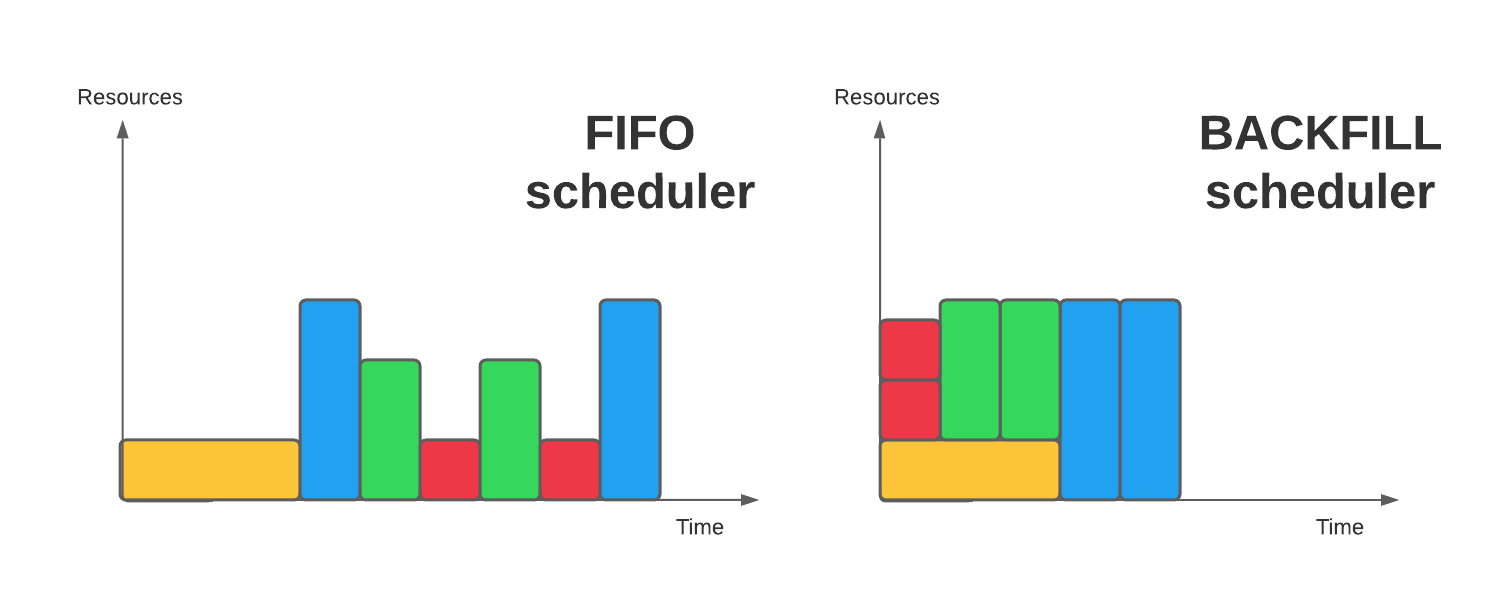
Specifying time limits with the --time option is importing to ensuring that your job has enough time to run. The lower your time, the better chances of your job being "backfilled".
Backfill is a mechanism that allows lower priority jobs to begin earlier in order to fill idle slots, as long as they are completed before the next high priority job is expected to begin based on resource availability. In other words, if your job is small enough, it can be backfilled and scheduled alongside a larger, higher-priority job.
Note
If you do not specify a --time option, you will be defaulted to 1 hour. After 1 hour, your job will be canceled.
CPU
CPU is not the easiest parameter to optimise (unless your tool is single-threaded).
Although a parallel code execution can save significant time compared to execution on a single core, you may notice that the speed of your code execution does not increase in proportion to the number of IT resources used.
If you need more CPUs than a single node has, please see the section on MPI.
Note
If you do not specify one of the many cpu/node options in Slurm, you will be defaulted 1 cpu/task/node.
GPU
Check your job is currently using the GPU, for example, you can use the nvidia-smi command during processesing.